
Creating Facebook Events – How to throw a buzz-worthy bash in the social media age
The last months of the year seem to be full of events – from birthdays and anniversaries to non-profit galas and holiday parties. One easy, cost-effective way to reach out to guests is a Facebook Event.
Advantages of a Facebook Event:
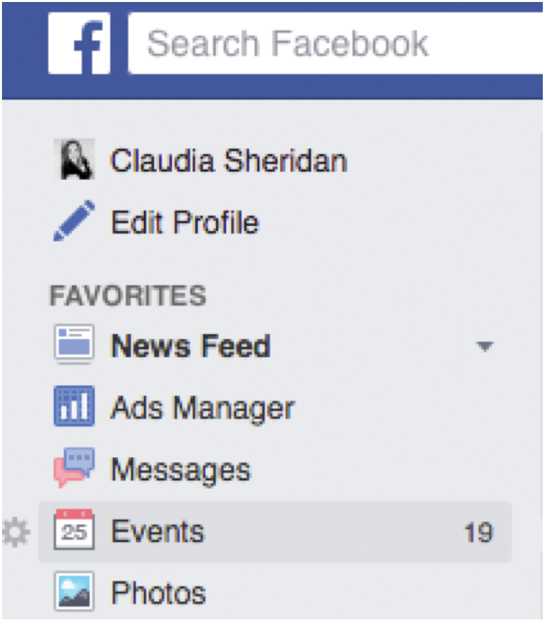
Step 1) Click Events in tahe left menu of your News Feed
Step 2) Click Create in the top right
Step 3) Click Create Private Event to choose between a private or public event. Fill in the event name, details, location and time.
Step 4) Click Create.
Step 5) You can make your event private or public.
If your business is hosting a one-day sale or a public event, making your event Public allows any Facebook user to register for the event. Conversely, if you’re hosting a child’s birthday party, you may want to set the event to private, in which case only those you invite have access to the details of the event. Keep in mind: You may change event settings from public to private, but Facebook does not allow you to change your event from private to public.
Step 6) Inviting people and tracking RSVPs is simple.
There’s no need to know mailing addresses when inviting friends to your event. To invite friends, click Invite at the top right of your event, just below your event’s photo. Search for and select friends to invite, and click Send Invites. Those invited will receive a notification where they can identify if they are “Going,” “Maybe” or “Can’t Go” if it is a private event, or they can select “Interested” or “Going” for public events. As the event host, you have the ability to see all responses.
It’s a timesaver!
Setting up a Facebook event only takes a few minutes and can be done in just a few clicks. In fact, there are only five steps to create an event on Facebook.
If this is your first time creating a Facebook Event, here are a few tips to keep in mind:
Be selective when inviting friends. If you have hundreds or thousands of friends, inviting all of them to an event can be flagged as spam. If your event is a local one, invite only those who seem likely to attend.
Make it easy for people to find information about your public event. Place more important information in the first 2-3 lines of the event description. For example, if guests have to purchase tickets to your event, list the website or phone number first.
Specify an end time for your event. Facebook defaults your event to 3 hours if no end time is specified, so if it’s an all-day event, make sure to let your guests know by listing the start and end time.
Engage with your guests. Just because a guest selects “Going” doesn’t mean they are guaranteed to show up. Keep people excited about the event by posting event details, photos, videos, etc. to the event wall. Encourage guests to respond to your posts.
Add a cover photo that represents the event. The cover photo is like a magazine cover for your event. Avoid using the event flyer unless you can see all of the information you need in the space provided. Facebook recommends a cover photo that measures 714 x 264 pixels in size.
Share your event with others. If you’re hosting a public event, think outside of Facebook and share your event on other social media platforms like Twitter, Instagram, Tumblr, LinkedIn, etc. Reach out to local bloggers or other organizations to share the event with their following.
For more information about social media, call me at 661-310-1313 or email me at Claudia@SmallBusinessBreakthrough.com. Sign up at www.SmallBusinessBreakthrough.com to receive free Social Media Tips for Small Business Owners in your inbox.



Comments
ADVERTISE WITH US

Dining Out Like a Sommelier
Do you know how to navigate a restaurant wine list, how to select wines that impress without overspending, and without irritating restaurant staff? This was my assignment for élite Magazine’s article. And yes, I have a lot of opinions on the matter, some of which I...
Set Your Business Up for Success in 2026 with VIA
As we approach the final stretch of the year, now is the perfect time to invest in your business’s success for 2026—and VIA is the community to help you do it. VIA is more than just a professional organization; it’s a network of leaders, innovators, and...
Master Sergeant Lucas R. Hilmo: From Santa Clarita to Global Service
Some stories begin in small hometowns and unfold onto the world stage, marked by courage, commitment, and quiet strength. Such is the journey of Master Sergeant Lucas Richard Hilmo, a Santa Clarita native whose career in the United States Air Force has taken him...